

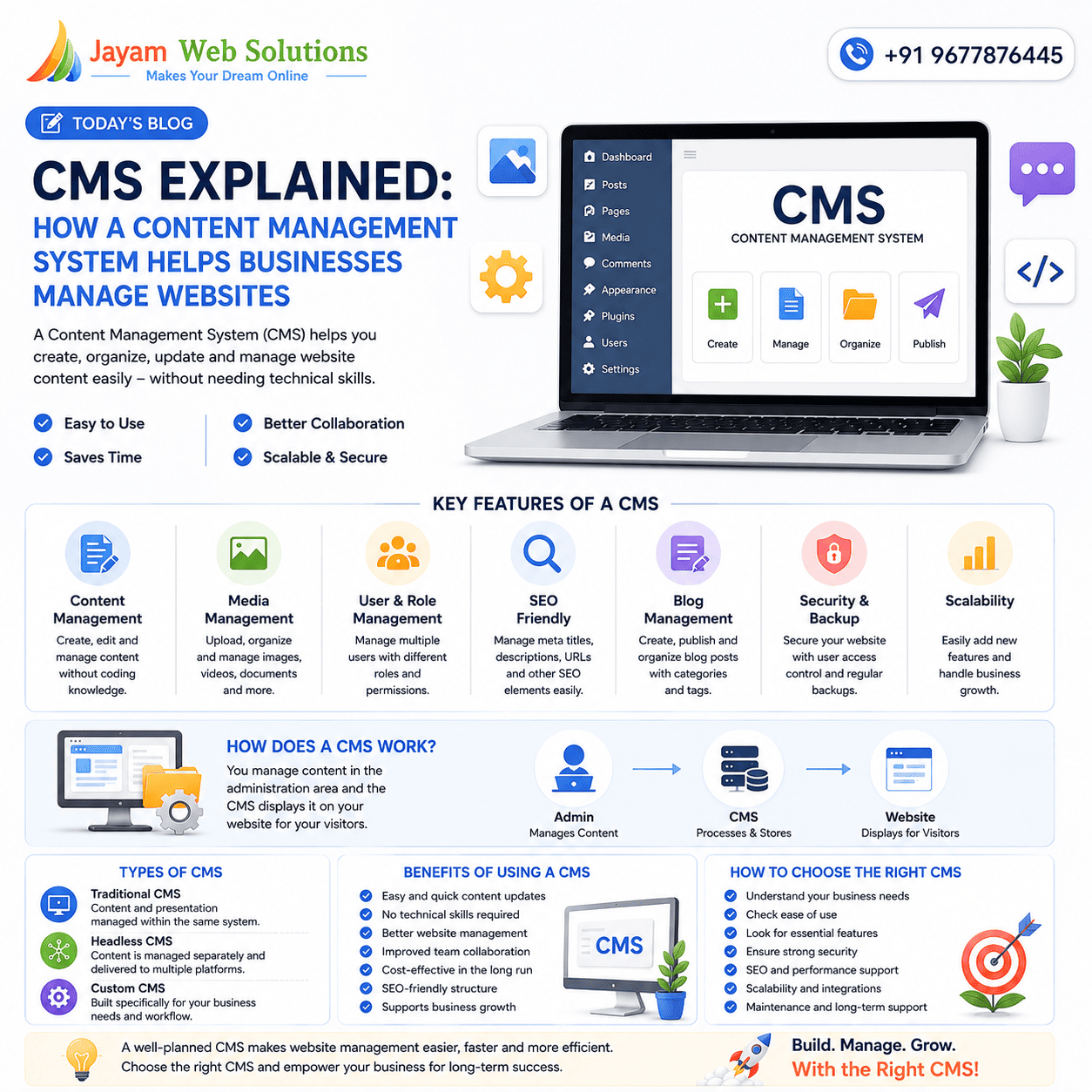
CMS Explained: How a Content Management System Helps Businesses Manage Websites
Introduction
Managing a business website does not always require technical knowledge. A Content Management System (CMS) allows businesses and website administrators to create, update, organize, and manage website content through a user-friendly interface.
Without a CMS, making regular website changes may require developers to manually edit website files and update code. For businesses that frequently publish blogs, update services, add products, or change images, this process can become time-consuming.
A CMS simplifies website management by providing tools that allow authorized users to manage content efficiently.
From company websites and blogs to e-commerce stores and large business portals, CMS platforms can support different types of digital experiences.
What Is a Content Management System?
A Content Management System (CMS) is software that helps users create and manage digital content without requiring them to build every page manually using code.
A typical CMS allows administrators to:
- Create website pages
- Edit existing content
- Upload images and documents
- Publish blog posts
- Manage menus
- Update product information
- Manage users and permissions
- Organize content
- Schedule or publish updates
The exact features depend on the CMS platform and how it has been configured.
A CMS can therefore act as the central system through which a business manages the content displayed on its website.
How Does a CMS Work?
A CMS generally consists of two important areas.
1. Content Management Interface
This is the administrative area where authorized users manage website content.
For example, an administrator may log in and:
- Add a new page
- Change text
- Upload an image
- Update a service
- Publish a blog
- Modify product details
2. Website Presentation
The content entered through the CMS is displayed on the public website according to the website's design and structure.
This separation between content and presentation makes it easier for businesses to manage information without constantly modifying the underlying website code.
Why Do Businesses Need a CMS?
Business websites are rarely static. Information changes regularly.
A company may need to:
- Add new services
- Update contact information
- Publish blogs
- Add customer testimonials
- Update products
- Upload new images
- Announce company news
- Change promotional content
If every small update requires developer assistance, it can increase time and operational costs.
A CMS gives authorized employees the ability to manage many routine updates themselves.
This can make website management faster and more convenient.
Key Features of a CMS
Different CMS platforms provide different features, but several capabilities are commonly important for businesses.
1. Easy Content Editing
A CMS usually provides an editor through which users can create and modify content.
Users can update:
- Text
- Headings
- Images
- Links
- Videos
- Documents
This allows non-technical team members to manage website content more easily.
2. Page Management
A CMS can make it easier to create and manage different website pages.
For example:
- Home
- About Us
- Services
- Products
- Blog
- Contact
- FAQ
- Career
Administrators can add, edit, organize, or remove pages depending on their permissions.
3. Media Management
Businesses use images, videos, PDFs, brochures, certificates, and other media across their websites.
A CMS can provide a centralized media library where administrators can upload and organize these files.
Proper media management can make content updates more efficient.
4. User and Role Management
A business may have multiple people managing its website.
A CMS can provide different levels of access.
For example:
Administrator → Editor → Content Writer → Contributor
Each role can be given appropriate permissions.
This helps businesses control who can create, edit, publish, or manage specific website content.
5. SEO-Friendly Features
SEO is an important consideration when selecting a CMS.
A business-focused CMS should make it possible to manage SEO-related elements such as:
- Page titles
- Meta descriptions
- SEO-friendly URLs
- Headings
- Image alt text
- Internal links
- Structured content
SEO capabilities vary between platforms, so businesses should evaluate whether the CMS supports their specific SEO requirements.
6. Blog Management
Businesses that use content marketing can benefit from built-in blog management.
A CMS can help users:
- Create blog posts
- Add featured images
- Organize categories
- Add tags
- Publish articles
- Update existing posts
- Manage authors
This makes regular content publishing easier for marketing teams.
7. Mobile-Friendly Website Management
A CMS itself does not automatically guarantee a mobile-friendly website.
The website's theme, design, development, and implementation also matter.
When selecting a CMS, businesses should ensure that the resulting website can provide a good experience across:
- Smartphones
- Tablets
- Laptops
- Desktop computers
Responsive design should be considered from the beginning of the website development process.
8. Security and Access Control
Website security is another important consideration.
A CMS should be properly maintained and configured to reduce security risks.
Businesses should consider:
- Strong administrator passwords
- Role-based permissions
- Secure hosting
- Regular software updates
- Reliable backups
- Secure connections
- Monitoring for suspicious activity
Security requirements can vary depending on the website and the type of information it manages.
9. Website Backup and Recovery
Website content represents valuable business information.
A proper backup strategy can help protect against accidental deletion, technical problems, or other unexpected situations.
Businesses should consider maintaining regular backups of:
- Website files
- Database
- Media
- Content
- Configuration
Backup and recovery procedures should be tested rather than simply assumed to work.
Types of CMS Platforms
CMS solutions can generally be considered in several categories.
Traditional CMS
A traditional CMS combines content management and website presentation within the same system.
This approach can be suitable for many company websites and blogs.
Headless CMS
A headless CMS separates content management from the presentation layer.
Content can potentially be delivered to different platforms such as:
- Websites
- Mobile applications
- Digital displays
- Other digital interfaces
This approach can provide greater flexibility for businesses managing content across multiple channels.
Custom CMS
A custom CMS is developed specifically according to an organization's requirements.
It can be designed around the company's:
- Workflow
- User roles
- Business processes
- Content structure
- Integrations
- Reporting requirements
Custom CMS development can be useful when standard platforms do not provide the required functionality.
CMS vs Custom Website Development
A CMS and custom website development are not necessarily competing choices.
A custom-developed website can also include a CMS.
For example, a business may require a custom website design while also wanting an administrative dashboard through which employees can update content.
The right approach depends on the business requirements.
A simple informational website may need only basic content management, while a complex organization may require customized workflows and integrations.
Benefits of Using a CMS for Business
A well-planned CMS can provide several benefits.
Faster Content Updates
Employees can make routine changes without depending on developers for every small update.
Better Content Organization
Pages, blogs, images, products, and documents can be organized within a structured system.
Improved Team Collaboration
Different employees can work with different permissions.
Scalability
A CMS can make it easier to add more content as a business grows.
Consistent Content Management
Centralized content management can help teams maintain consistent information across the website.
Reduced Development Dependency
Routine content changes may require less developer involvement.
CMS for E-Commerce Websites
E-commerce websites often require more advanced content management capabilities.
A CMS integrated with e-commerce functionality can help manage:
- Products
- Categories
- Product descriptions
- Images
- Prices
- Offers
- Inventory information
- Customer-facing content
- Blog content
For larger stores, businesses should also consider scalability, performance, security, integrations, and product management workflows.
CMS and Third-Party Integrations
Modern business websites often need to connect with external systems.
Depending on the requirements, a CMS may integrate with:
- Payment gateways
- CRM systems
- Email marketing platforms
- Analytics tools
- Social media platforms
- Customer support systems
- ERP software
- SMS services
- Business APIs
These integrations can help connect website content management with broader business operations.
How to Choose the Right CMS
There is no single CMS that is ideal for every business.
Before selecting a platform, consider the following factors:
Business Requirements
Understand what the website needs to accomplish.
Ease of Use
The administrative interface should be understandable to the people who will use it.
Scalability
Consider whether the CMS can support future growth.
Security
Review available security features, updates, access controls, and maintenance requirements.
SEO Support
Check whether important SEO elements can be managed effectively.
Performance
The CMS and its implementation should support good website performance.
Customization
Consider whether the platform can be customized to match business requirements.
Integration
Check whether required third-party tools and systems can be integrated.
Maintenance
Understand the ongoing maintenance and update requirements before choosing a platform.
Common CMS Mistakes to Avoid
Businesses can face problems when a CMS is poorly planned or maintained.
Common mistakes include:
- Giving every user administrator access
- Ignoring software updates
- Using outdated plugins or extensions
- Not maintaining backups
- Uploading unnecessarily large images
- Creating duplicate content
- Ignoring SEO settings
- Installing unnecessary extensions
- Failing to review user permissions
A CMS should be treated as an important part of the website infrastructure rather than simply a content editor.
CMS and the Future of Website Management
Website management is becoming increasingly connected with automation, personalization, analytics, and multi-channel content delivery.
Businesses may increasingly look for CMS solutions that support:
- AI-assisted content workflows
- Personalized experiences
- Headless architecture
- API-based integrations
- Automation
- Advanced analytics
- Multi-language content
- Omnichannel publishing
- Strong security
- Scalable infrastructure
However, businesses should select technologies based on actual requirements rather than adopting trends simply because they are new.
Final Thoughts
A Content Management System (CMS) can make website management easier, faster, and more organized.
From updating a simple company website to managing a large e-commerce platform, the right CMS can give businesses greater control over their digital content.
Before selecting a CMS, businesses should consider usability, security, SEO, scalability, performance, customization, integrations, and long-term maintenance.
The best CMS is not necessarily the one with the most features. It is the one that matches the business's actual requirements and provides a practical foundation for future growth.
At Jayam Web Solutions, we develop website and CMS solutions based on individual business requirements, helping organizations manage their digital content through practical and scalable systems.
Visit us at www.jayamwebsolutions.com to get started!
Kindly Reach us / Call us +91 9677876445