

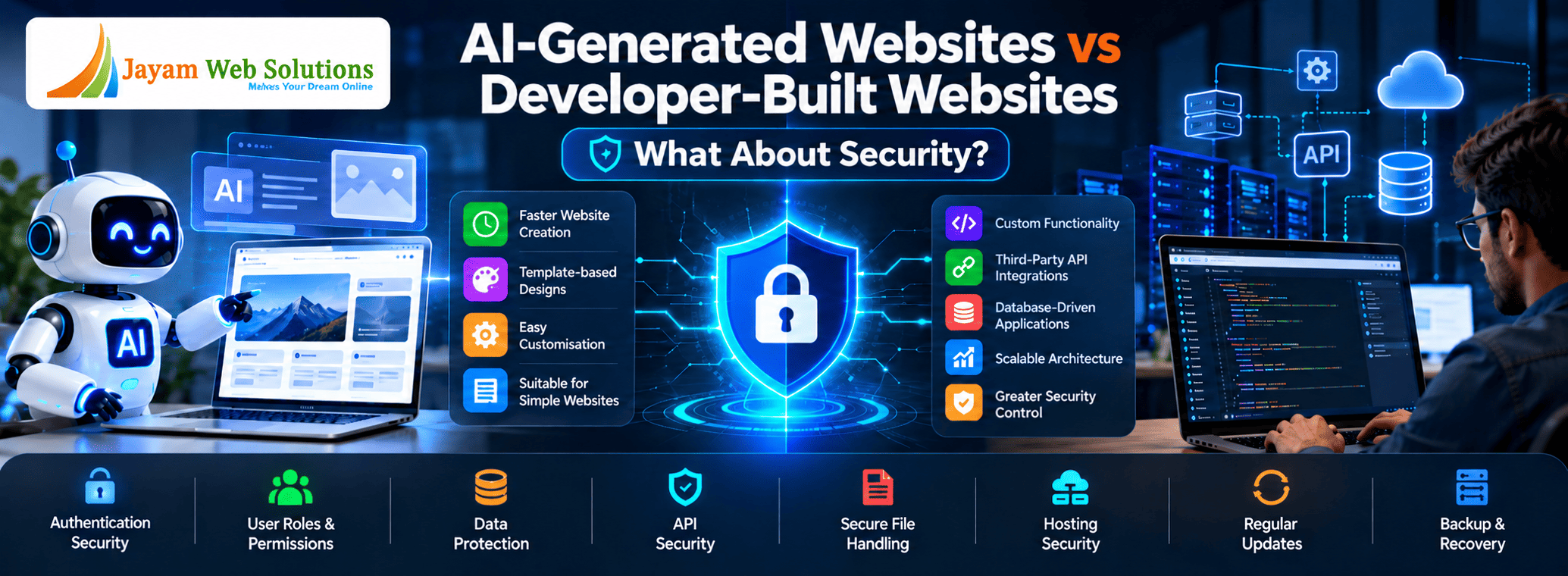
AI-Generated Websites vs Developer-Built Websites: What About Security?
Building a website has become considerably easier with modern AI tools. A business can now describe its requirements and receive layouts, content, code and even functional components within a short period of time.
But getting a website online is only one part of the process.
Once a website starts accepting customer enquiries, storing information, providing user accounts, processing transactions or connecting with other business systems, security becomes a business responsibility.
This raises an important question:
Does a website created with AI provide the same level of security as one developed by professional developers?
There is no simple yes-or-no answer.
Security is influenced by the technology used, the way the application is implemented, the hosting environment, the information being handled and how regularly the system is maintained.
Therefore, businesses should evaluate the complete security setup rather than judging a website only by the method used to create it.
What Actually Determines Whether a Website Is Secure?
A website can have excellent visual design and still have weaknesses behind the scenes.
Security can involve many different areas, including:
- Protecting user accounts
- Controlling access to information
- Validating information submitted through forms
- Securing databases
- Protecting APIs
- Managing files and documents
- Keeping software components updated
- Securing the hosting environment
- Protecting payment transactions
- Maintaining reliable backups
- Detecting unusual activity
- Recovering from technical failures
The requirements also change according to the purpose of the website.
A five-page company profile does not carry the same security responsibilities as a customer portal containing personal information and payment records.
AI Website, AI-Generated Code and AI-Assisted Development Are Different
The term AI website can refer to several completely different development approaches.
For example, a business might use:
An AI Website Builder
The platform creates the website within its own environment. Hosting, infrastructure and some security responsibilities may remain with the platform provider.
AI-Generated Code
An AI tool creates portions of the frontend or backend code, which can then be reviewed and modified.
AI-Assisted Professional Development
Developers use AI as part of their normal workflow for coding, testing, debugging and documentation while they remain responsible for the final application.
These three approaches have different levels of control and responsibility.
Therefore, saying that a website is “AI-built” does not tell us enough about its actual security.
Can an AI-Created Website Be Secure?
Yes.
Using AI to create part of a website does not automatically introduce a security problem.
AI can produce useful code and can even assist developers in identifying potential issues.
However, generated output still needs to be evaluated before it becomes part of a production system.
An AI tool may not fully understand:
- The company's internal processes
- Which information is confidential
- Which employees should access specific records
- How existing systems are configured
- Which regulations apply to the business
- How a particular API behaves
- What should happen when an operation fails
Those decisions require project-specific understanding.
So the important question is not whether AI participated in development.
The important question is whether the resulting system has been properly reviewed and secured.
Can a Developer-Built Website Have Security Problems?
Definitely.
Having a developer write the code does not automatically make an application secure.
Security issues can arise from:
- Poor implementation
- Incorrect permissions
- Outdated libraries
- Weak authentication
- Unsafe server configuration
- Unprotected APIs
- Improper file handling
- Missing updates
- Inadequate testing
Even experienced developers can introduce vulnerabilities if security is not considered throughout the development process.
This means businesses should not choose a development approach based only on the label AI or developer.
They should examine the actual security practices behind the project.
Where Does the Business Have Control?
One important consideration is how much technical control the business receives.
Some AI website platforms manage most of the technical environment for the customer.
The provider may take care of areas such as:
- Hosting infrastructure
- Platform software
- Server maintenance
- Certain security updates
- Database infrastructure
This can make website management easier.
However, the business may have fewer options when it wants to change the infrastructure or implement functionality that the platform does not support.
With a custom-developed application, businesses can generally have greater control over areas such as:
- Application code
- Database
- Hosting environment
- API connections
- Authentication
- Deployment
- Backup arrangements
The exact level of control depends on the development and hosting arrangement.
1. Login Security Needs More Than a Login Screen
A website that allows users to create accounts needs to protect those accounts throughout their entire lifecycle.
Consider a customer portal.
The system may need to handle:
- Account creation
- Verification
- Login
- Password recovery
- Session management
- Account changes
- Logout
- Account suspension
A business application may also use different authentication methods such as OTP or other identity mechanisms.
Each method needs to be implemented correctly.
A login page by itself does not make an application secure.
2. Access Permissions Are Just as Important as Authentication
Imagine that an employee successfully logs into an application.
That proves the person's identity, but it does not mean they should be able to see everything inside the system.
For example:
Sales Staff
- View assigned customers
- Create quotations
- Update enquiries
Accounts Staff
- View invoices
- Record payments
- Generate financial reports
Administrator
- Manage users
- Configure settings
- Control system-wide functions
The application needs to enforce these boundaries.
If access control is implemented only in the visible interface but not properly enforced on the backend, hiding a menu item does not necessarily protect the underlying data.
This is why permission design is an important part of secure application development.
3. Customer Data Needs Appropriate Protection
Businesses increasingly store customer information online.
Depending on the application, this might include:
- Names
- Contact details
- Addresses
- Order information
- Documents
- Account history
- Transaction records
The application should be designed so that information is available only to authorised users and processes.
Developers need to consider how information is:
received → processed → stored → accessed → updated → removed
Each stage can have security implications.
4. The Database Is a Critical Part of the System
Visitors normally see only the website interface.
Behind it, however, there may be a database containing years of business information.
For example:
Customer → Order → Payment → Invoice → Delivery
These records can be connected in many ways.
If the database structure or access mechanism is poorly designed, the application may suffer from:
- Unnecessary data exposure
- Incorrect records
- Weak access control
- Poor performance
- Difficult recovery
Developers therefore need to think about both data organisation and data protection.
5. APIs Create Additional Communication Points
Many business applications depend on external services.
A travel platform might communicate with hotel and booking services.
An ecommerce application might communicate with:
- Payment services
- Shipping systems
- SMS providers
- Email services
A location-based application might use mapping services.
An AI-enabled application may communicate with an AI API.
Every external connection needs appropriate handling.
The application should protect credentials, verify incoming information and determine what should happen when the external service is unavailable.
6. API Credentials Should Not Be Treated Like Ordinary Website Content
Businesses sometimes assume that an API key is harmless because it is simply a string of characters.
That can be a dangerous assumption.
Credentials that provide access to external services need to be stored and handled appropriately.
Depending on the architecture, developers may need to use:
- Server-side configuration
- Environment variables
- Restricted API credentials
- Permission limits
- Key rotation
- Access monitoring
The exact method depends on the service and application architecture.
This is another area where understanding the complete system matters more than simply generating code.
7. Forms Are Another Area That Needs Protection
A business website may contain many input points:
- Contact forms
- Registration forms
- Login forms
- Search fields
- Enquiry forms
- File upload forms
- Payment forms
Information received from visitors should not automatically be trusted.
The application should check whether the submitted information is valid and appropriate before processing it.
This helps reduce problems caused by malformed or malicious requests.
8. File Uploads Need Special Handling
A business application may allow users to upload:
- Product photographs
- PDF quotations
- Invoices
- Resumes
- Business documents
- Identification documents
Allowing unrestricted uploads can create unnecessary risk.
A properly designed system may need restrictions involving:
- File size
- File format
- Storage location
- Access permissions
- File naming
- Download permissions
The appropriate controls depend on the application's requirements and the sensitivity of the files.
9. Payment-Enabled Websites Need Careful Integration
Security becomes especially important when money is involved.
A payment workflow may contain several stages:
Order → Payment Request → Gateway → Transaction Confirmation → Application Update → Receipt
The application should not simply assume that a payment succeeded because a customer reached a particular page.
The transaction needs to be verified appropriately.
There should also be clear handling for situations such as:
- Failed payments
- Delayed responses
- Duplicate requests
- Cancelled transactions
- Refunds
- Communication failures
This type of workflow benefits from proper development and testing.
10. Third-Party Software Can Affect Security
Web applications commonly depend on external libraries and software components.
These components may receive updates because security weaknesses are discovered over time.
For this reason, developers and maintenance teams should know:
- Which dependencies are being used
- Which versions are installed
- Whether security updates are available
- Whether an outdated component should be replaced
This is not unique to AI-generated applications.
Any software project that depends on third-party components needs an appropriate maintenance process.
11. Hosting Is Part of the Security Picture
A website does not operate in isolation.
It runs somewhere.
Depending on the setup, this could be:
- Managed hosting
- Shared hosting
- VPS
- Cloud infrastructure
- Dedicated infrastructure
- A platform-managed environment
The security of the production environment can involve:
- Operating system updates
- Server permissions
- Firewall configuration
- Database access
- SSL/TLS
- Administrative credentials
- Backups
- Monitoring
A secure application can still be exposed to unnecessary risk if its production environment is poorly maintained.
12. Security Needs Attention After Launch
A common mistake is to treat security as a development-stage activity only.
The website may be secure when launched and become more exposed later if nobody maintains it.
Over time:
- Software versions change
- Dependencies become outdated
- New vulnerabilities are discovered
- APIs change
- Server software receives updates
- Business requirements change
A maintenance plan should therefore form part of the overall website strategy.
13. Backups Help When Prevention Is Not Enough
No system should rely exclusively on prevention.
Businesses should also prepare for the possibility of:
- Accidental deletion
- Hardware problems
- Database corruption
- Application errors
- Hosting failures
- Security incidents
A useful backup strategy should answer:
What is backed up?
How often is it backed up?
Where is it stored?
How long is it retained?
Has restoration actually been tested?
For an important business application, recovery planning can be just as valuable as prevention.
14. AI-Generated Code Should Be Reviewed Before Production Use
AI can generate code quickly.
But speed does not remove the need for technical review.
A developer reviewing generated code may check whether:
- It matches the application's architecture
- User input is handled correctly
- Permissions are enforced
- Database operations are appropriate
- Sensitive information is protected
- Errors are handled properly
- External services are integrated safely
This review becomes particularly important when AI has generated backend or security-sensitive functionality.
15. Professional Development Does Not Mean Ignoring AI
Businesses do not necessarily have to choose between AI and professional developers.
A modern development workflow can combine both.
For example:
Business Analysis → Technical Planning → AI-Assisted Development → Developer Review → Testing → Security Checks → Deployment
AI can help speed up repetitive technical work.
Developers can concentrate on:
- Understanding requirements
- Designing the architecture
- Reviewing implementation
- Managing security
- Testing the complete system
- Handling deployment
- Maintaining the application
This can provide the benefits of AI without removing professional responsibility from the project.
16. Different Websites Need Different Levels of Security
It is important not to overcomplicate a simple website.
A small company website containing:
- Home
- About
- Services
- Gallery
- Contact
has a very different risk profile from an application containing:
- Customer accounts
- Employee accounts
- Financial transactions
- Business documents
- Payment processing
- APIs
- Administrative controls
The security approach should therefore match the actual risk and functionality of the website.
AI Website Platforms Can Be Practical for Certain Businesses
AI-powered website platforms can be useful when the business needs:
- A quick online presence
- A basic company website
- Landing pages
- Simple content management
- A relatively straightforward website
A managed platform may also reduce the amount of server administration required from the business.
However, businesses should understand exactly what the platform manages and what remains their responsibility.
Custom Development Can Be More Appropriate for Complex Requirements
Custom development becomes particularly relevant when a website needs:
- Complex business rules
- Multiple user categories
- Custom permissions
- Large databases
- Payment workflows
- Several API integrations
- Business automation
- Special reporting
- Custom security requirements
- Long-term scalability
The major advantage is not simply that developers write the code.
It is that the system can be designed around the company's specific requirements.
A Security Comparison
| Area | AI Platform | Custom Developer-Built Application |
|---|---|---|
| Infrastructure | Often platform managed | Can be selected and configured |
| Source code control | Depends on provider | Usually greater |
| Database control | Platform dependent | Can be customised |
| Authentication | Available features depend on platform | Can be designed for requirements |
| User permissions | Platform dependent | Can be tailored |
| API integration | Depends on available capabilities | Greater flexibility |
| Server control | Usually limited | Potentially extensive |
| Backup options | Depends on provider | Can be independently planned |
| Security review | Depends on platform | Can be specifically arranged |
| Maintenance | Some may be platform managed | Requires an agreed maintenance process |
This table should not be interpreted as saying that one option is automatically secure and the other is unsafe.
The actual implementation matters.
Questions Businesses Should Ask Before Selecting an AI Website Platform
Before committing to a platform, businesses should understand:
Where will our information be stored?
This is especially important when customer or business data is involved.
What security responsibilities remain with us?
A managed platform may handle some areas but not everything.
Can we export the website and business data?
This affects future portability.
What happens when the subscription ends?
Businesses should know whether they can recover their website and data.
How are user accounts protected?
This matters if customers or employees can log in.
How are backups handled?
Understand the available recovery options.
What happens when an integration fails?
This is important for payment, communication and business APIs.
Questions to Ask a Web Development Company
When discussing a custom application, businesses can ask:
- How will user access be controlled?
- How will sensitive information be protected?
- Where will the database be hosted?
- How will APIs be secured?
- What testing will be carried out?
- How will backups be maintained?
- Who handles security updates?
- What happens if a vulnerability is discovered?
- Who will manage the application after launch?
- How can the system be expanded later?
The answers can help a business understand whether the development process has been planned beyond the initial launch.
So, Which Is Safer: AI or Developers?
There is no universal answer.
An AI-powered platform can provide a secure managed environment for a suitable type of website.
A developer-built application can provide greater control for businesses with specialised requirements.
But either approach can become problematic if it is poorly configured or neglected.
A more useful way to think about website security is:
Requirements + Architecture + Implementation + Infrastructure + Testing + Maintenance
All six contribute to the final result.
The Better Approach for Many Businesses
For some organisations, the most practical solution may not be purely AI-generated or purely traditional.
A developer-led, AI-assisted approach can combine both.
AI can support developers with:
- Prototyping
- Code generation
- Debugging
- Testing assistance
- Documentation
- Repetitive development work
Developers can remain responsible for:
- Architecture
- Business logic
- Security decisions
- Data design
- API integration
- Code review
- Testing
- Deployment
- Maintenance
This approach recognises that AI is a powerful development tool while keeping important technical decisions under professional oversight.
Final Thoughts
Website security is not determined by a single question such as “Was AI used to build it?”
The more useful questions are:
What information does the website handle?
Who can access it?
Where is the information stored?
How are external services connected?
Who manages updates?
How are failures handled?
How can the system be recovered if something goes wrong?
For a simple business website, a managed AI platform may provide an appropriate solution.
For a complex business application involving accounts, payments, sensitive information, custom workflows and multiple integrations, businesses should examine the technical architecture and ongoing maintenance requirements much more carefully.
AI can certainly play an important role in modern web development. But regardless of how much AI is used, security still requires appropriate design, implementation, testing and continuous attention.
The goal should not be to choose between “AI” and “developers” based on the label.
The goal should be to choose a development approach that gives the business the right combination of security, control, reliability, flexibility and long-term support.
Frequently Asked Questions
Are AI-generated websites safe for businesses?
They can be, depending on the platform, configuration, functionality and maintenance practices. Businesses should evaluate what security controls the platform provides and what responsibilities remain with them.
Does using AI code make a website vulnerable?
Not automatically. AI-generated code can contain mistakes, so it should be reviewed and tested before being used in a production environment.
Are custom websites more secure?
Custom development can provide greater control over application architecture, permissions, databases and infrastructure. However, security still depends on the quality of development and ongoing maintenance.
Can an AI website handle customer login?
Some AI platforms support authentication and customer accounts. Businesses should check whether the available authentication and permission features are adequate for their specific requirements.
Is AI suitable for ecommerce websites?
AI-based tools can be useful for certain ecommerce requirements. However, businesses handling payments, customer accounts, inventory and third-party integrations should carefully evaluate security, data control and platform capabilities.
Should I choose an AI website builder or a developer?
For straightforward websites, an AI website builder may be sufficient. If the project involves complex workflows, custom functionality, sensitive information, multiple integrations or long-term scalability, professional development may be more appropriate.
Can developers use AI when building secure websites?
Yes. AI can be used as a development aid for coding, testing, debugging and documentation. Professional review and security validation are still important before deployment.
Jayam Web Solutions – Makes Your Dream Online.