

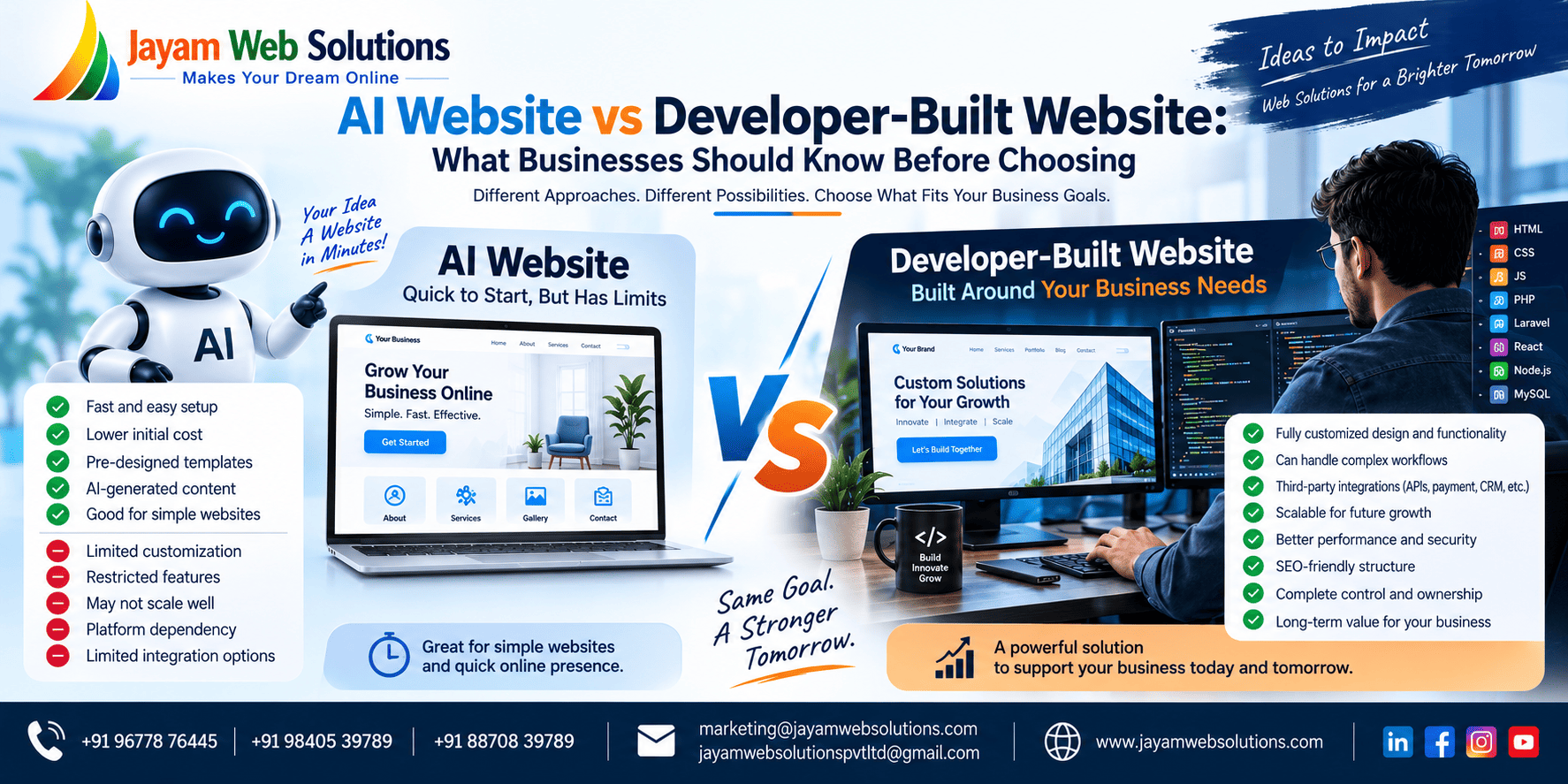
AI Website vs Developer-Built Website: What Businesses Should Know Before Choosing
Creating a website has become much easier than it was a few years ago.
Today, a business owner can enter a description into an AI-powered website platform and receive a ready-made website structure within a short period. Pages, text sections, images and layouts can be generated with very little technical involvement.
This has changed the way businesses think about website development.
At the same time, professional developers continue to build websites that involve databases, customer accounts, payment systems, business workflows, API connections and other specialized functions.
So a business owner now faces a different question:
Should I use AI to create my website, or should I hire a developer?
The answer depends on what you expect the website to do.
If the website is primarily intended to introduce the company and display basic information, a simple creation tool may meet the requirement.
If the website is expected to become part of the company's daily operations, the decision becomes more technical.
This article explains the difference between these approaches and the factors businesses should consider before choosing one.
First, What Do We Mean by an AI Website?
An AI website is generally created with a platform that uses artificial intelligence to assist with website generation.
Instead of beginning with a blank screen, the user provides information such as:
- Business name
- Industry
- Services
- Preferred style
- Target audience
- Required pages
The system can then produce an initial website concept.
Depending on the service being used, AI may help generate:
- Page layouts
- Written content
- Images
- Headlines
- Navigation
- Colour combinations
- Calls to action
- Basic SEO information
The owner can then edit the generated result.
This approach reduces the amount of technical work needed to get a basic website online.
What Happens When a Developer Builds the Website?
A developer-built website begins with a different process.
The developer first needs to understand what the company does, who will use the website and what the website is expected to accomplish.
From there, the project may involve:
Requirement analysis → Planning → UI/UX design → Development → Testing → Deployment
Depending on the project, development can include front-end interfaces, databases, user accounts, business logic, APIs, payment systems and administrative panels.
The important distinction is that the website is constructed according to a defined project specification rather than being limited to the functions offered by a particular website-building platform.
AI Website and Developer-Built Website Are Not the Same Type of Solution
It is tempting to compare the two as if they are competing versions of exactly the same product.
In reality, they can serve very different purposes.
An AI website generator is primarily a creation tool.
Professional development is a software development process.
A simple company website may need only pages and contact information.
A business platform may need:
Login → Dashboard → Customer → Order → Invoice → Payment → Reports
The second example requires considerably more than page generation.
That distinction should be understood before making a decision.
What Can an AI Website Builder Do?
AI-based website creation tools can be useful for several common tasks.
Creating a Starting Design
Instead of spending hours creating the first layout, a business owner can describe the desired website and receive an initial design.
Generating Website Content
AI can assist with:
- Headings
- Service descriptions
- Short introductions
- FAQs
- Calls to action
The generated content should still be reviewed before publication because the business needs accurate and original information.
Producing Standard Pages
A typical company website may contain:
- Home
- About
- Services
- Products
- Gallery
- Blog
- Contact
These types of pages can often be created without extensive programming.
Making Basic Changes
Users can generally modify text, images, colours and sections through the platform's editing interface.
This can be convenient for people who do not have development experience.
Where an AI-Generated Website Can Become Difficult
The situation changes when the website needs to perform tasks that are unique to the company.
Imagine a business that wants customers to:
- Select products
- Enter quantities
- Add several products to a request
- Submit the requirement
- Receive an acknowledgement
- Allow staff to review the request
- Prepare a quotation
- Send it to the customer
- Track approval
- Convert the approved request into an order
This is no longer simply a website containing pages.
It is a business workflow implemented through software.
At this stage, the technical architecture becomes much more important.
A Developer Can Build Around the Business Workflow
With custom development, the workflow can be translated into software components.
For example:
Customer Side
The customer can:
- Register
- Log in
- Submit an enquiry
- View quotations
- Approve a quotation
- View invoices
- Check payment status
Employee Side
The employee can:
- Receive enquiries
- Prepare quotations
- Update customer information
- Generate invoices
- Track payments
Management Side
Management can:
- Approve quotations
- Monitor transactions
- View reports
- Manage users
- Review business activity
Each area can be connected to the same underlying system.
This is one of the major differences between creating pages and developing a business application.
Design Is More Than Selecting a Good-Looking Template
AI can produce attractive visual layouts.
But a business website also needs to answer practical questions.
For example:
- What should visitors see first?
- Which service should receive greater attention?
- Where should the enquiry button appear?
- How should products be presented?
- What information does a customer need before contacting the company?
- What should happen after a form is submitted?
A professional design process considers these questions before deciding how the page should look.
The goal is not simply to make a website attractive.
The goal is to make the website useful to the people visiting it.
What About SEO?
Another common assumption is that an AI-generated website will automatically be SEO-friendly.
That should not be assumed.
Search visibility involves many elements, including:
- Page content
- Search intent
- Page titles
- Meta descriptions
- Heading structure
- Internal linking
- URLs
- Image handling
- Mobile usability
- Technical accessibility
- Website performance
- Structured data
AI can assist with some of these activities, but it does not remove the need for proper SEO planning.
The same applies to a developer-built website.
A professionally coded website can still perform poorly in search if its content and SEO structure are not properly planned.
Therefore:
AI-generated does not automatically mean SEO-friendly.
And:
Developer-built does not automatically mean SEO-friendly.
SEO needs to be deliberately addressed in either approach.
What About Website Speed?
Website performance depends on how the final website is constructed and delivered.
Factors can include:
- Image sizes
- Scripts
- Third-party services
- Code
- Hosting
- Caching
- Database operations
- Server configuration
A website-building platform may take care of certain technical areas automatically.
With a custom website, developers can make architectural decisions based on the expected workload and functionality.
For example, a simple five-page company website has very different performance considerations from an application handling thousands of customer transactions.
What About Security?
Security becomes increasingly important when the website stores or processes information.
A basic informational website may have relatively limited data exposure.
A customer portal could contain:
- Customer accounts
- Documents
- Orders
- Invoices
- Payment information
- Personal information
An internal business application could additionally contain employee or financial records.
In such cases, areas such as authentication, permissions, data validation, secure communication, access control and backups need careful attention.
The more sensitive the information, the more important the underlying technical approach becomes.
What If the Business Needs Payment Integration?
Suppose a company wants customers to pay directly through the website.
The project may then involve:
Customer → Order → Payment Gateway → Transaction Result → Database → Invoice → Notification
The system needs to understand what happens when:
- Payment succeeds
- Payment fails
- Payment is cancelled
- Payment remains pending
- The customer tries again
The payment result may also need to update the customer's account and generate an invoice.
This is an example of functionality where a business may require more than standard page-building capabilities.
What If the Website Needs Customer Login?
A customer login system introduces another layer of functionality.
The website may need:
- Account creation
- Authentication
- Password management
- User permissions
- Customer dashboard
- Personal records
- Order history
- Invoice access
- Secure sessions
If employees and administrators also have separate access, the application becomes even more complex.
This is where professional web application development becomes particularly relevant.
What If the Website Needs API Integration?
Many businesses use several digital systems.
For example:
Website → CRM → Payment Gateway → Accounting System → Shipping Platform
Information may need to move between these systems automatically.
API integration allows different software systems to communicate.
Examples include:
- Payment APIs
- SMS APIs
- Email APIs
- Shipping APIs
- Maps APIs
- CRM APIs
- Accounting APIs
- Booking APIs
The complexity of these connections should be considered before choosing a website creation method.
What Happens When the Business Grows?
A website may begin as a simple company profile and gradually become more important.
For example:
Stage 1
Company website
Stage 2
Online enquiry system
Stage 3
Customer accounts
Stage 4
Online payments
Stage 5
Customer dashboard
Stage 6
Internal management system
Stage 7
Mobile application or additional integrations
If significant growth is expected, the business should consider whether its initial platform can accommodate future changes.
AI Can Also Be Used by Professional Developers
This is an important point that is often missed.
Choosing a developer does not mean avoiding AI.
Developers can use AI tools to assist with:
- Code generation
- Debugging
- Test creation
- Documentation
- Research
- Code explanation
- Development assistance
- Content preparation
The developer remains responsible for checking the generated output and integrating it appropriately into the project.
Therefore, the modern development model can be:
Business Requirement + Developer Expertise + AI Assistance
rather than:
AI vs Developer
This can provide businesses with the benefits of AI while retaining professional control over the final product.
When an AI Website May Make Sense
An AI website tool may be worth considering when your requirements are relatively straightforward.
For example:
- Small business profile
- Personal website
- Portfolio
- Basic service website
- Simple landing page
- Event information website
- Temporary campaign website
If the website's main purpose is to present information, a simple creation platform may be enough.
When Professional Development May Make More Sense
Consider professional development when the website needs to become part of the company's operations.
Examples include:
- Customer portals
- Employee portals
- Vendor systems
- CRM
- Billing
- Quotation management
- Inventory
- Booking systems
- Ecommerce
- Payment processing
- SaaS applications
- Complex reporting
- Multiple user roles
- Business automation
- Third-party integrations
In these situations, the website is functioning more like software than a traditional informational website.
What About Cost?
Cost should not be the only factor used to compare the two options.
An AI website platform may have a lower initial entry cost.
But the business should also consider:
- Subscription charges
- Additional features
- Plugin or integration costs
- Migration possibilities
- Maintenance
- Custom development requirements
- Future expansion
- Platform dependency
A developer-built solution may require a larger initial investment, but the scope and control can be substantially different.
The right comparison is therefore not simply:
“Which one is cheaper?”
A better question is:
“Which approach provides the functionality and control the business actually needs?”
What About Website Ownership?
Before choosing any website platform, understand what happens to your:
- Website files
- Content
- Images
- Domain
- Database
- Customer information
- Integrations
Ask whether the website can be moved to another platform or hosting provider later.
This is particularly important for businesses planning to use the website for many years.
Questions to Ask Before Making a Decision
Before choosing an AI website platform or hiring a developer, write down the answers to these questions:
1. What is the website supposed to accomplish?
Is it mainly informational or does it need to perform business activities?
2. Who will use it?
Only visitors, or will customers, employees and vendors also log in?
3. Will users have different permissions?
If yes, the application will require a proper access-control structure.
4. Does the website need external integrations?
List every system that needs to exchange information.
5. Will customers make payments?
If yes, payment processing and transaction management need to be planned.
6. Will the website grow?
Think about future users, products, locations, services and functionality.
7. Who will maintain it?
Decide who will handle technical changes, security and future improvements.
8. How much control does the business need?
Consider the importance of hosting, data, source code, integrations and migration options.
A Simple Decision Guide
Choose an AI Website Approach When:
Your requirement is mainly:
Website pages
↓
Business information
↓
Images and content
↓
Contact form
↓
Online presence
Consider Developer-Built Development When:
Your requirement is closer to:
User Login
↓
Dashboard
↓
Business Workflow
↓
Database
↓
API Integration
↓
Payment / Transaction
↓
Reports
↓
Automation
The second structure is closer to a web application than a conventional website.
Can an AI Website Be Used as the First Version?
Yes, this can be a practical approach for some businesses.
A company could begin with a simple website to establish its online presence and later move toward a more customized platform as its requirements become clearer.
However, before doing this, consider whether the initial platform allows the business to export or migrate its content and data.
Otherwise, moving to a new system later may require additional work.
What Should Businesses Focus on in 2026?
The biggest change is not simply that AI can create websites.
The bigger change is that AI is becoming part of the overall development process.
Businesses can now use AI for:
- Ideas
- Content drafts
- Design concepts
- Coding assistance
- Testing assistance
- Customer support
- Data analysis
- Automation
But the final website still needs to solve a real business problem.
Technology should support the business rather than becoming the objective itself.
Frequently Asked Questions
Is an AI website suitable for every business?
No. The suitability depends on what the website needs to accomplish. Straightforward websites may work well with AI-assisted creation, while complex business systems may require professional development.
Can AI completely replace a web developer?
AI can automate or assist with many development tasks, but complex projects still require requirement analysis, architecture, testing, security review, integration work and ongoing technical decisions.
Is a developer-built website always more expensive?
The cost depends on the project's scope. A simple developer-built website and a complex custom application are very different projects.
Can AI create an ecommerce website?
AI can assist with creating ecommerce pages and some platform-based stores. More specialized ecommerce workflows may require additional development.
Can AI create a CRM?
AI tools can help create interfaces and certain functionality, but a full CRM involves customer data, permissions, workflows, databases, reporting and integrations. The required approach depends on the scope.
Can developers use AI while building a website?
Yes. AI can be used as a development assistant while the developer reviews and controls the implementation.
Which option gives more customization?
The level of customization depends on the platform, but custom development generally provides greater freedom to create business-specific workflows and functionality.
Conclusion
AI has made website creation faster and more accessible.
For a business that needs a straightforward online presence, an AI-powered website platform can be a useful starting point.
However, a website becomes a different kind of project when it needs to manage customers, employees, payments, quotations, bookings, inventory, databases, reports or business workflows.
At that point, the question is no longer simply about creating web pages.
It becomes a question of building software around the business.
Professional developers can also use AI as part of the development process, which means businesses do not necessarily have to choose between modern AI technology and professional development.
The right decision should be based on:
What does your business need today?
What could it need tomorrow?
How much control and customization do you require?
Once those questions are clear, it becomes much easier to select the appropriate approach.
Need a Website or Custom Web Application?
Jayam Web Solutions helps businesses create websites and web applications based on their actual requirements.
Our services include:
- Custom Website Development
- Business Website Development
- Responsive Website Design
- SEO-Friendly Websites
- E-commerce Website Development
- Custom Web Application Development
- Billing Applications
- Quotation Generation Systems
- CRM Development
- LMS Development
- Booking Applications
- SaaS Development
- API Integration
- Business Automation
🌐 www.jayamwebsolutions.com
📧 marketing@jayamwebsolutions.com
📧 jayamwebsolutionspvtltd@gmail.com
📞 +91 96778 76445 | +91 98405 99789 | +91 88708 39789
Jayam Web Solutions - Makes Your Dream Online